반응형
🐚 9. 셸 스크립트 프로그래밍
1️⃣ 스크립트 작성 & 실행 방법
- 스크립트 시작은 항상 #!/bin/bash
- 실행 방법
sh script.sh # sh로 실행
chmod +x script.sh && ./script.sh # 실행 권한 주고 직접 실행
flowchart LR A[사용자 입력] --> B[Shell Script] B --> C[리눅스 커널 실행] C --> D[결과 출력]
2️⃣ 자주 사용하는 셸 스크립트
📌 로그 백업 & 정리 스크립트
#!/bin/bash
# log_backup.sh
LOG_DIR="/var/log/myapp"# 로그가 있는 폴더
BACKUP_DIR="/var/backups/myapp"# 백업 저장 폴더
DATE=$(date +%Y%m%d) # 오늘 날짜 (예: 20250916)
mkdir -p "$BACKUP_DIR" # 백업 폴더 없으면 생성
# 7일 지난 .log 파일 찾아서 백업하고 내용 비움 find "$LOG_DIR" -type f -name "*.log" -mtime +7 | whileread file; do tar -czf "$BACKUP_DIR/$(basename $file).$DATE.tar.gz" "$file" # 압축 백업
> "$file" # 원본 로그는 지우지 않고 내용만 삭제done
👉 현업에서 매우 많이 씀 (로그 용량이 차서 서버가 죽는 걸 방지)
📌 프로세스 모니터링 & 재시작
#!/bin/bash
# monitor.sh
PROCESS="myapp" # 감시할 프로세스 이름
if ! pgrep -x "$PROCESS" > /dev/null; then # 실행 중인지 확인
echo "$(date): $PROCESS not running. Restarting..." >> /var/log/monitor.log
systemctl start "$PROCESS" # 안 돌아가면 재시작
fi
👉 운영팀 필수 (서비스가 죽었을 때 자동 복구)
📌 서버 헬스체크
#!/bin/bash
# healthcheck.sh
echo "===== $(hostname) =====" # 서버 이름
echo "Uptime:" # 서버 켜진 시간
uptime
echo
echo "Disk usage:" # 디스크 사용량
df -h | grep -v tmpfs
echo
echo "Top 5 memory-consuming processes:" # 메모리 많이 쓰는 상위 5개
ps aux --sort=-%mem | head -n 6
👉 운영팀 기본 (서버 상태를 빠르게 확인할 때)
📌 대량 파일 이름 변경
#!/bin/bash# rename.shfor file in *.txt; do# 모든 .txt 파일에 대해mv"$file" "${file%.txt}.bak" # 확장자 .txt → .bak 로 변경done
👉 파일 대량 처리할 때 개발자들이 자주 활용
📌 배포 자동화 (단순 버전)
#!/bin/bash
# deploy.sh
APP_DIR=
"/opt/myapp"
# 앱 코드 경로
BACKUP_DIR=
"/opt/backup"
# 백업 저장 경로
DATE=$(
date
+%Y%m%d%H%M)
# 현재 시간
tar -czf
"$BACKUP_DIR
/myapp_
$DATE
.tar.gz"
"$APP_DIR
"
# 현재 버전 백업
git -C
"$APP_DIR
" pull origin main
# 최신 코드 받기
systemctl restart myapp.service
# 서비스 재시작
👉 스타트업/중소기업에서 직접 서버 운영 시 자주 사용
3️⃣ 실습 예제: .txt → .bak 변환하기
① 연습 디렉토리 만들기
mkdir ~/rename-test # 테스트용 폴더 만들기 cd ~/rename-test
② 샘플 파일 생성
touch file1.txt file2.txt file3.txt # 빈 텍스트 파일 3개 생성 ls
③ 스크립트 작성
vi rename.sh
내용:
#!/bin/bash
for
file
in
*.txt;
do
# 모든 .txt 파일에 대해
mv
"$file
"
"${file%.txt}
.bak"
# 확장자를 .bak으로 변경
done
④ 실행 권한 부여
chmod +x rename.sh
⑤ 실행
./rename.sh ls
👉 결과: file1.bak file2.bak file3.bak
❓ Quiz : 되돌리기
.bak → .txt 로 다시 복원하려면?
#!/bin/bashfor
file in *.bak;
do# 모든 .bak 파일에 대해
mv"$file" "${file%.bak}.txt" # 확장자를 .txt로 변경
done
⊡ 기본if문
if1.sh
if [ 조건]
then
참일경우실행
fi
#!/bin/bash
if [ "KIM" = "KIM" ]
then
echo "It's true."
fi
exit 0

⊡ if-else문
if2.sh
if [ 조건]
then
참일경우실행
else
거짓일경우실행
fi
#!/bin/bash
if [ "KIM" = "LEE" ]
then
echo "It's true."
else
echo "It's false."
fi
exit 0

⊡ 조건문에들어가는비교연산자
if3.sh
#!/bin/bash
if [ 100 -eq 200 ]
then
echo "100 and 200 are the same."
else
echo "100 and 200 are different"
fi
exit 0

⊡ 파일과 관련된 조건
if4.sh
#!/bin/bash
fname=/lib/systemd/system/httpd.service
if [ -f $fname]
then
head -5 $fname
else
echo "Web server is not installed."
fi
exit 0

⊡ case~esac문
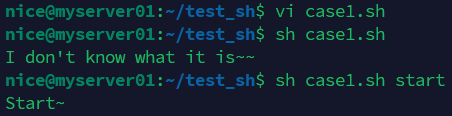
case1.sh
#!/bin/bash
case "$1" in
start)
echo "Start~";;
stop)
echo "Stop~";;
restart)
echo "Restart~";;
*)
echo "I don't know what it is~~";;
esac
exit 0

case2.sh
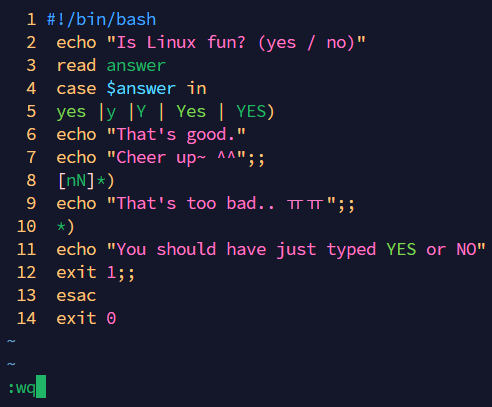
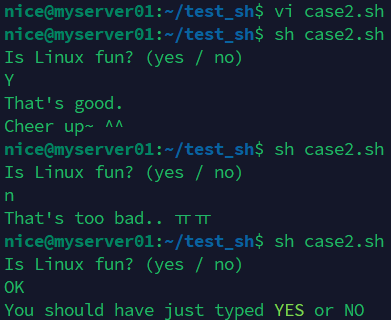
#!/bin/bash
echo "Is Linux fun? (yes / no)"
read answer
case $answer in yes |y |Y | Yes |YES)
echo "That's good."
echo "Cheer up~ ^^";;
[nN]*)
echo "That's too bad.. ㅠㅠ";;
*)
echo "You should have just typed YES or NO" exit 1;;
esac
exit 0
⊡ AND, OR 관계연산자
andor.sh
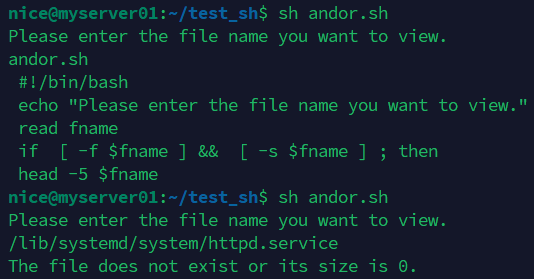
#!/bin/bash
echo "Please enter the file name you want to view."
read fname
if [ -f $fname] && [ -s $fname] ;
then
head -5 $fname
else
echo "The file does not exist or its size is 0."
fi
exit 0

⊡ for~in문
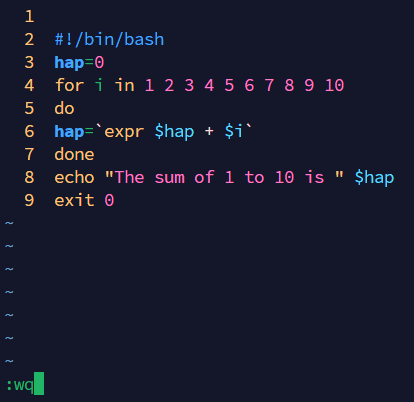
forin.sh
#!/bin/bash
hap=0
for i in 1 2 3 4 5 6 7 8 9 10
do
hap=`expr $hap + $i`
done
echo "The sum of 1 to 10 is " $hap
exit 0

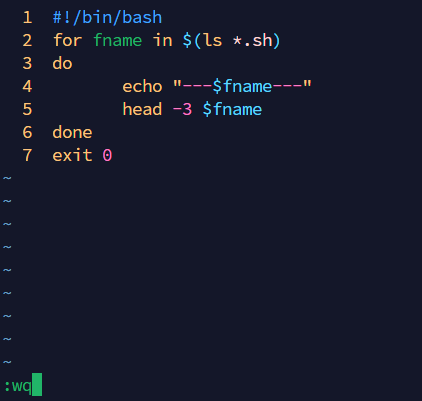
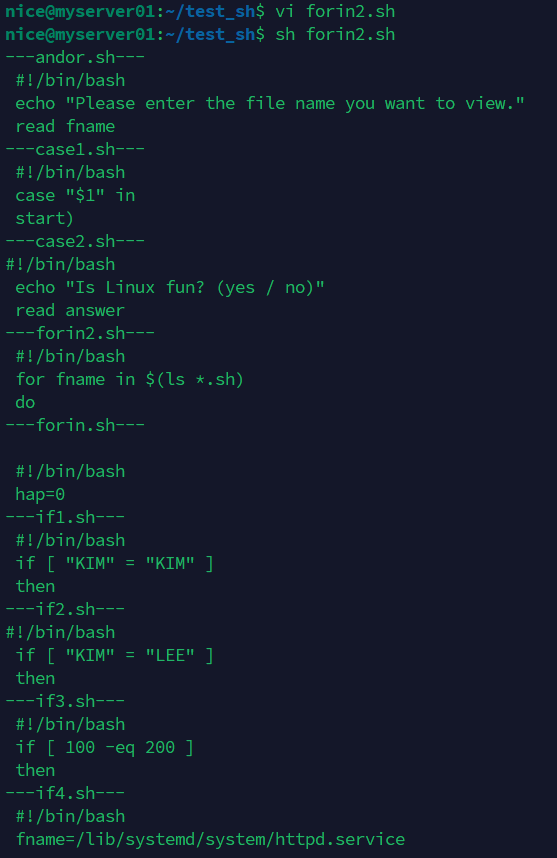
forin2.sh
#!/bin/bash
for fnamein $(ls *.sh)
do
echo "---$fname---"
head -3 $fname
done
exit 0
⊡ while문
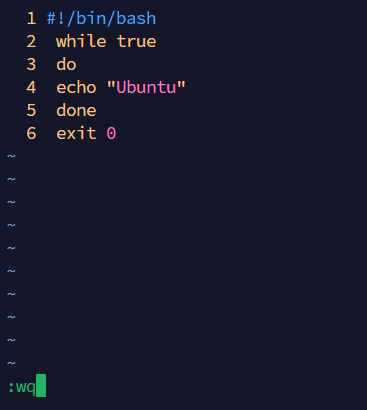
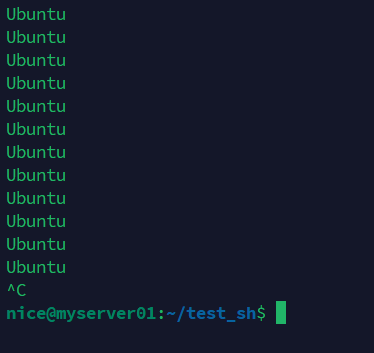
while.sh
#!/bin/bash
while true
do
echo "Ubuntu"
done
exit 0
#!/bin/bash
while :
do
echo "Ubuntu"
done
exit 0
while2.sh
` -> 햅틱보다는 요즘 $로 많이 사용
#!/bin/bash
hap=0 i=1
while [ $i-le 10 ]
do
hap=`expr $hap + $i`
i=`expr $i+ 1`
done
echo "The sum of 1 to 10 is: $hap"
exit 0
#!/bin/bash
hap=0 i=1
while [ $i-le 10 ]
do
hap=$((hap + i))
i=$((i+ 1))
done
echo "The sum of 1 to 10 is: $hap"
exit 0


while3.sh
#!/bin/bash
echo "Please enter your password."
read mypass
while [ "$mypass" != "1234" ]
do
echo "Incorrect. Please re-enter."
read mypass
done
echo "Success~"
exit 0


⊡ until문
조건식이참일때까지(=거짓인동안) 계속반복
until.sh
#!/bin/bash
hap=0
i=1
while [ $i-le 10 ]
do
hap=`expr $hap + $i`
i=`expr $i + 1`
done
echo "The sum of 1 to 10 is: $hap"
exit 0
#!/bin/bash
hap=0
i=1
until [ $i-gt 10 ]
do
hap=`expr $hap + $i`
i=`expr $i + 1`
done
echo "The sum of 1 to 10 is: $hap"
exit 0


⊡ break, continue, exit, return
bce.sh
#!/bin/bash
echo "Starts infinite loop input. (b : break, c : continue, e : exit)"
while true; do
read input
case $input in
b | B)
break
;;
c | C)
echo "If you press continue, it will return to the while condition" continue
;;
e | E)
echo "If you press exit, the program (function) will be completely terminated."
exit 1
;;
*)
echo "Unknown input. Please press b, c, or e."
;;
esac
done
echo "If you press break, it will exit while and print this sentence."
exit 0


🎯 정리
- 셸 스크립트 = 반복되는 일을 자동으로 해주는 “작은 프로그램”
- 현업에서 많이 쓰는 것
- 로그 정리 (서버 터짐 방지)
- 프로세스 모니터링 (서비스 다운되면 자동 복구)
- 서버 헬스체크 (운영팀 점검)
- 대량 파일 이름/텍스트 처리
- 배포 자동화
- 중학생 수준 비유: 집에서 매일 하는 일(청소, 정리, 확인)을 사람이 직접 하지 않고 자동 로봇이 대신 해주는 것 🚀
반응형
'Cloud Engineering Bootcamp > 5. Linux' 카테고리의 다른 글
| 10. 리눅스 종합 실습 (0) | 2025.09.17 |
|---|---|
| 08. 리눅스 쉘 사용하기 (0) | 2025.09.16 |
| 07. 리눅스 사용자 관리 (0) | 2025.09.15 |
| 06. 프로세스 관리하기 (0) | 2025.09.15 |
| 05. 파일 접근권한 관리하기 (0) | 2025.09.15 |